Talking Calculator
Project Description:
This project creates a very simple calculator that will do the four basic arithmetic operations, + - x /.
The result of the calculation will be displayed on the screen and converted to speech.
Simple error checking will be introduced.
This program will use:
This project creates a very simple calculator that will do the four basic arithmetic operations, + - x /.
The result of the calculation will be displayed on the screen and converted to speech.
Simple error checking will be introduced.
This program will use:
- global variables
- programmer defined procedures
- numbers to text
- text to speech
- building a sentence
- mathematical calculations
- textboxes for input
- labels for output
- events to change labels and perform calculations
- basic error checking (input restrictions)
- Notifier to issue error messages
- component (object) properties changed during run time
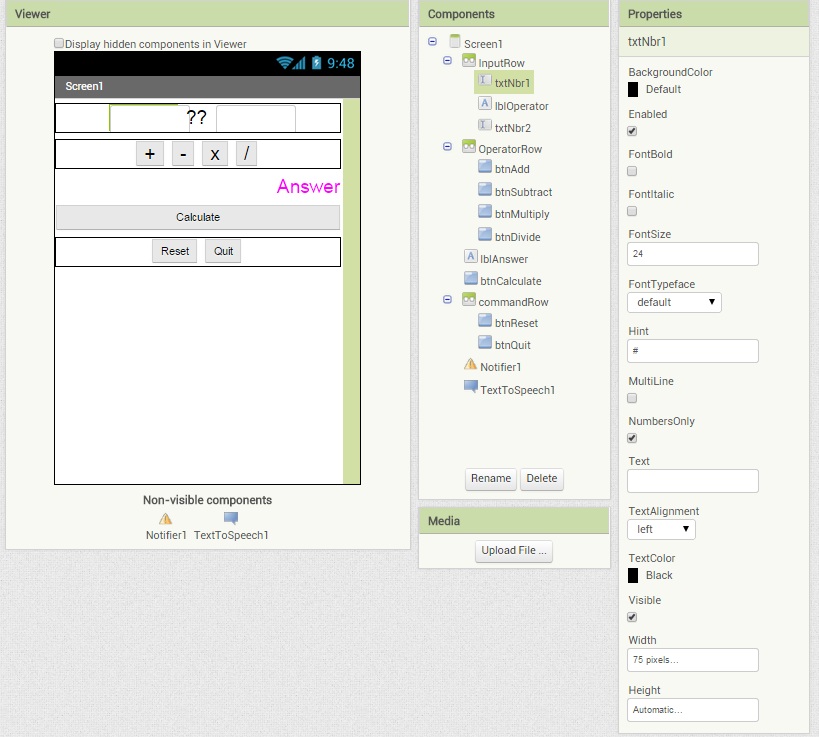
Coding: Step #1 Build the User Interface
|
Palette
|
Component
|
Properties
|
|
Layout
|
HorizontalArrangement
Quantity: 3 |
Names: inputRow, operatorRow, commandRow
The inputRow will hold: txtNbr1, lblOperator, txtNbr2 The operatorRow will hold: btnAdd, btnSubtract, btnMultiply and btnDivide The commandRow will hold: btnReset, btnQuit |
|
User Interface
|
TextBox
Quantity: 2 |
Names: txtNbr1 and txtNbr2
Font Size: 24 Hint: # Numbers Only: Text: Width: 75 pixels |
|
User Interface
|
Label
Quantity: 2 |
Names: lblOperator and lblAnswer
Font Size: 24 Hint: # Numbers Only: Text: Width: 75 pixels |
|
User Interface
|
Button
Quantity: 7 |
Names:
btnAdd, btnSubtract, btnMultiply, btnDivide, btnReset, btnQuit, btnCalculate. Change the text on the button as required Note: the btnCalculate is not in a horizontal arrangement component, the width is set to fill parent. |
Coding: Step #2 Create the Instructions
The user Interface must be completed before you can build the code
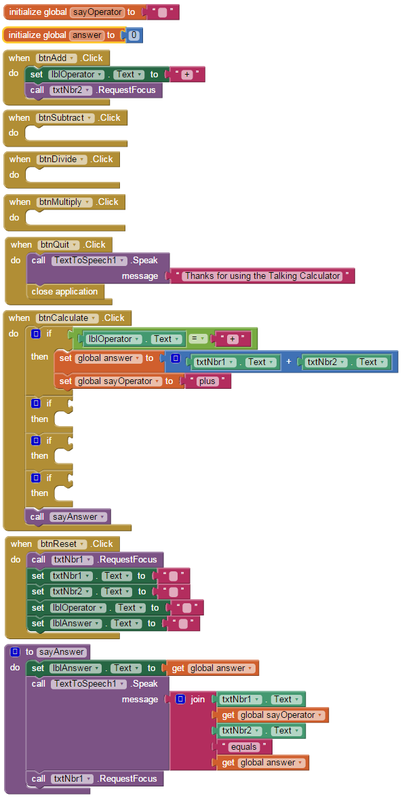
Complete the missing blocks as required to make the program function correctly.
The colour of the blocks will give you a hint where to find the block.
NOTE: you will need to create the procedure to sayAnswer before you can use the block call sayAnswer.
The colour of the blocks will give you a hint where to find the block.
NOTE: you will need to create the procedure to sayAnswer before you can use the block call sayAnswer.
